
O'Reilly Pro
O'Reilly Auto PartsAuto & Vehicles
3.1368.00 Reviews
- Version
- 1.26.0
- Installs
- 500.00K
- Age Rating
- Everyone
Screenshots

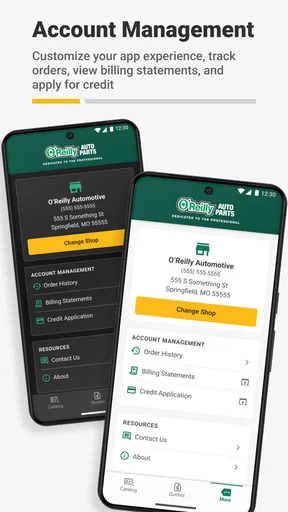
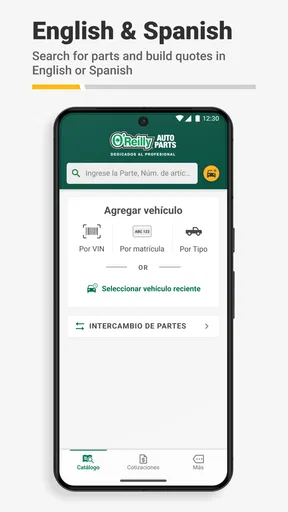
Our Review of O'Reilly Pro
 Analysis by Appyee
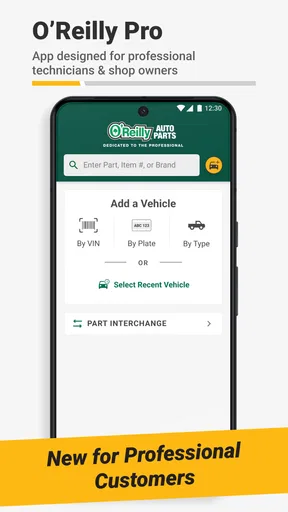
When a vehicle needs a part, the difficult part is often not finding a store. It is identifying the correct component, checking whether it fits, and getting the request to the right person without starting the search again. I tested O'Reilly Pro with that kind of problem in mind, and its purpose becomes clearest when viewed as a working tool rather than a general shopping app. It is an Auto & Vehicles app from O'Reilly Auto Parts, aimed at streamlining parts lookup and ordering for people who deal with vehicle repairs regularly.
That focus matters. A private driver who buys a cabin filter once a year may be perfectly comfortable using a normal retail app or asking a store employee for help. A technician, parts counter worker, fleet coordinator, or independent repair professional has a different need: less wandering through menus, fewer repeated vehicle details, and a smoother path from a customer request to an order. My overall impression is that O'Reilly Pro is most useful when the app sits inside an existing repair workflow, where speed and accurate handoffs matter more than browsing for accessories.
From a vehicle problem to a parts request
The starting condition is usually simple but urgent. Someone brings in a vehicle with a failed sensor, worn brake component, warning light, or routine maintenance requirement. The person handling the request needs to turn a description into a specific part search. That is where a specialized professional-facing tool has an advantage over a standard web search: the task begins with vehicle information and a repair need, not with a vague product category.
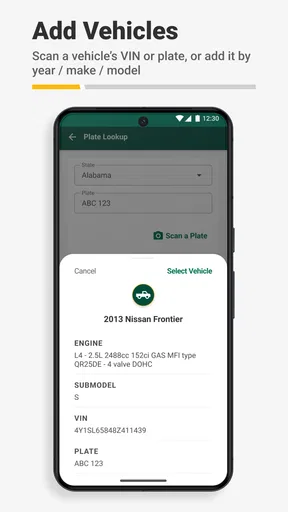
I found it helpful to approach the app with the same discipline I would use at a parts counter. Before searching, I would gather the vehicle’s year, make, model, engine details when relevant, and the exact repair symptom. This is not busywork. A parts lookup can appear successful while still leading to the wrong variation if the vehicle information is incomplete. The app can make the lookup process more organized, but it cannot replace careful identification of the vehicle or a sensible diagnosis.
That distinction is one of the most important practical lessons. O'Reilly Pro is not a substitute for deciding whether the problem is a brake hose, a sensor, a fuse, or something else. It is better understood as the bridge between a known repair requirement and the parts-ordering stage. If the diagnosis is uncertain, I would use the app after narrowing the possibilities rather than treating the first matching result as proof.
The app is free, which removes an obvious barrier for a shop deciding whether to try it. It is rated for Everyone, so its presentation is not restricted to a specialist age group, although the actual value is clearly strongest for people involved in vehicle maintenance or parts purchasing. It was released on November 22, 2024, and the current version is 1.23.0, with support beginning at Android 9. Those details make it reasonably accessible on many existing Android devices, including phones that a small shop may keep at a counter instead of replacing frequently.
Building a reliable lookup instead of guessing
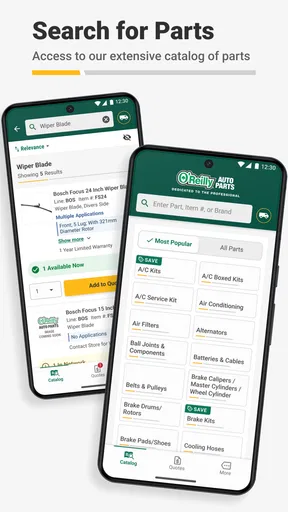
My recommended workflow starts with the vehicle, then moves to the repair category, and only afterward narrows the part. That order reduces the temptation to search by a loose phrase such as “front sensor” or “oil filter” and pick the first familiar-looking result. A professional parts tool is valuable precisely because the same everyday name can cover several different components.
Once the vehicle context is in place, I would compare the result against the original request before moving toward an order. The useful question is not simply “Did the app show a part?” but “Does this part answer the repair need I was given?” That extra pause is especially important when a customer has described a symptom rather than supplied a part number. A lookup tool can make searching faster while still requiring human judgment at the final selection point.
One non-obvious advantage of this approach is that it creates a cleaner handoff. If another employee has to finish the request, they can understand what was searched and why. Even without turning the app into a full repair record, a consistent vehicle-first process is easier to explain than a search based on memory. I would make a habit of keeping the customer’s wording separate from my own diagnosis, because that prevents an assumption from becoming hidden inside the order.
Moving from lookup to ordering
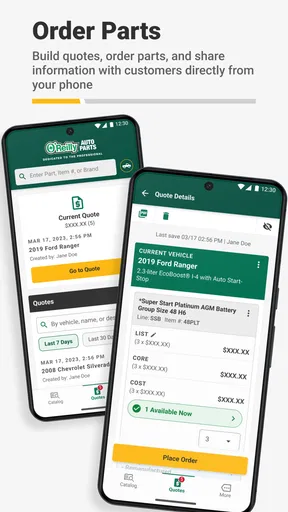
The next stage is where the app’s professional purpose becomes more apparent. A parts lookup has little value if the result cannot move naturally into an order request. In a busy repair setting, the person identifying the component may not be the same person who handles purchasing, receives the item, or contacts the customer. The best workflow therefore treats the selected part as a handoff, not as the end of the task.
I would review the vehicle match, part description, and quantity before sending the request onward. That short check is worth doing even when the result looks obvious. It catches common process errors such as selecting a rear component for a front repair, overlooking a second required item, or ordering one unit when the job needs a pair. The app helps organize the lookup, but the responsibility for translating the repair into an accurate order still sits with the user.
For a small workshop, this can be useful when one person speaks with the customer and another person manages parts. The first employee can work through the lookup while the second prepares the purchasing step. For a mobile mechanic, the same workflow can reduce the need to repeat the vehicle details while moving between a diagnosis and a parts request. In both cases, the gain is less about flashy functionality and more about reducing the number of times information has to be reconstructed.
Where the human handoff still matters
A parts app cannot remove every conversation. Some jobs require clarification about the repair, a confirmation from the customer, or a decision between an immediate replacement and a broader service. I would not use O'Reilly Pro as a reason to skip those conversations. Instead, I see it as a way to make the parts portion of the conversation more concrete.
Imagine a customer arrives late in the day with a vehicle that needs a replacement component before the next morning. The technician confirms the vehicle details and identifies the likely part. The counter employee uses the app to look up the item, checks the selection against the repair notes, and passes the order information to whoever is responsible for purchasing. If a different employee receives the part, the original vehicle context and selected component give that person a starting point for verification. The outcome is not just a faster search; it is a less fragile chain of responsibility.
That scenario also shows why I would avoid relying on a single person’s memory. If the customer’s description changes slightly between the bay, the counter, and purchasing, errors become more likely. A repeatable lookup process gives the team a shared reference point. The app is most useful when the shop agrees on how to use it, rather than when every employee searches in a completely different way.
There is a trade-off here. A tool built for professional parts work may feel more deliberate than a consumer shopping app. Someone looking for a quick accessory may prefer a broad catalog with visual browsing and casual recommendations. O'Reilly Pro makes more sense when the task begins with a vehicle and ends with a specific parts request. If that is not your normal situation, its focused design may not save you time.
Checking the result before the repair begins
The result of the workflow should be an order-ready parts decision, not merely a screen full of possible matches. Before the repair proceeds, I would verify that the chosen item corresponds to the vehicle and the intended job, then confirm the quantity and any related items the repair requires. This final review is especially useful when the original request came from a customer who used informal language.
One practical tip is to treat the lookup as a two-pass process. On the first pass, identify the likely component. On the second, read the result as if you were a colleague receiving the handoff: Is the vehicle clear? Is the part’s role clear? Would someone else know why this selection was made? This habit exposes ambiguity that can be missed when the person searching already knows what they meant.
Another useful trade-off involves speed versus confirmation. In a high-volume counter environment, it is tempting to move immediately from a plausible result to an order. That may save a moment, but a wrong component can cost far more through delays, returns, and another customer conversation. I would use the app to shorten the search, then spend the saved time on a deliberate verification rather than removing verification altogether.
The app’s adoption suggests that it has found an audience beyond a handful of testers: it has more than 500 thousand installs, alongside an average rating of 3.2 from roughly 827 ratings and 343 written reviews. I read that combination as a reason to approach it with balanced expectations. Enough people have tried it to make it relevant, but the rating also indicates that the experience may not feel equally smooth for everyone. It is a tool worth testing against your own workflow, not an automatic replacement for every existing method.
What happens when the workflow breaks
The first likely point of friction is incomplete vehicle information. If the person requesting the part does not know the engine configuration or gives an uncertain model description, the app cannot magically resolve the ambiguity. In that situation, I would pause the lookup and confirm the vehicle details before treating a result as final. A fast search built on bad input is still a bad process.
The second break occurs when the repair diagnosis is still open. A warning light or unusual noise can point to several possible causes, and a parts lookup may return something that matches the words without solving the real fault. I would use O'Reilly Pro after the diagnostic decision has narrowed the field. For troubleshooting, service information, or technical repair instructions, a dedicated repair reference may be the better companion.
The third issue is workflow fit. A shop that already has a mature inventory and ordering system may not want another place where information must be entered or checked. In that setting, the app is useful only if it reduces duplicate work. Before making it part of a team routine, I would test one complete request from customer conversation through receiving and ask where the app actually saves time. If employees still have to retype everything into another system, the benefit may be limited.
There is also a difference between a professional lookup tool and a general consumer marketplace. A consumer-oriented alternative may be better for comparing brands, browsing nonessential accessories, or shopping without exact vehicle information. O'Reilly Pro is the stronger choice when the priority is a focused parts lookup connected to a repair or ordering workflow. It is not the app I would choose simply to browse automotive products for inspiration.
Who should use it, and who should skip it
I would recommend trying it if you work at an independent repair shop, manage parts for a fleet, handle counter requests, or frequently translate vehicle problems into orders. It is also worth considering for a technician who wants a consistent lookup routine rather than relying on remembered catalog paths. The free price makes experimentation straightforward, and the Android 9 minimum means compatibility should not be limited to only the newest phones.
I would be more cautious if you are a casual driver who rarely buys parts, especially if you prefer asking a store employee to identify everything. You may gain little from learning a professional workflow for occasional maintenance. I would also skip making it your only tool if your work depends on deep diagnostic guidance, repair procedures, or a complete shop-management record. Those needs go beyond parts lookup and ordering.
For teams, the most sensible rollout is small. Use it on a few ordinary requests first, including one routine maintenance item and one repair where fitment needs careful checking. Compare the time spent gathering information, verifying the result, and passing the request to purchasing with the old method. The important measure is not how quickly the first search appears; it is whether the correct part reaches the repair without extra calls, duplicate searches, or avoidable corrections.
My final view after following the full workflow
O'Reilly Pro is a focused Auto & Vehicles app that makes the most sense as one link in a professional repair chain. I like the idea of moving from vehicle details to a more organized parts request, especially when several people share responsibility for a job. Its strongest contribution is process clarity: the lookup becomes easier to repeat, discuss, and hand off.
At the same time, I would not confuse a streamlined lookup with automatic accuracy. The user still needs a sound diagnosis, complete vehicle information, and a final check before ordering. The average rating of 3.2 also keeps my recommendation measured; I would test the current experience on the devices and workflow your team actually uses rather than assuming it will solve every counter problem.
My practical recommendation is simple: if your day includes repeated parts identification and ordering, install it and run a complete real request through it. Pay attention to the handoff, not just the search screen. If the app helps your team preserve vehicle context and reduce repeated work, it can earn a place in the routine. If you only need occasional consumer shopping or detailed repair guidance, a general retail app or a dedicated service reference may serve you better.
For the right user, the real benefit is a cleaner path from a customer’s vehicle problem to a checked, order-ready parts decision. That is narrower than a full automotive platform, but it is also why the app can be useful when the repair counter is busy and every avoidable restart costs time.
Privacy and Permissions
See what permissions an app requests and how it handles your data.
- Camera
- take pictures and videos
- Other
- view network connections, full network access, control vibration, prevent device from sleeping
Verdict
Strengths of O'Reilly Pro
- Excellent technical books, courses, and conference content in one app.
- Offline access lets you read or watch saved content without an internet connection.
- Search and filtering make it easier to find specific programming topics.
- Bookmarks and reading progress help you continue learning across sessions.
- Useful for developers seeking in-depth, professional-level training materials.
Limitations of O'Reilly Pro
- Requires an active O'Reilly subscription for full access to most content.
- The large catalog can feel overwhelming for beginners choosing a learning path.
- Video streaming may consume significant data when used outside Wi-Fi.
- Some older titles may feel dated compared with newer technologies.
- Advanced content can be difficult without prior programming experience.
Similar Picks in This Category
View All
Android Auto
Google LLC4.1

maxim — order a taxi & food
PT. SITO4.7

Штрафы ГИБДД: проверка с фото
Pays LLC – Штрафы ГИБДД4.7

Номерограм – проверка авто
Авто Ассист4.8

Дром Авто
Дром4.9

Frequently Asked Questions
What is O’Reilly Pro, and who is it designed for?
O’Reilly Pro is a learning and reference app built around O’Reilly’s technical books, video courses, live events, interactive lessons, and other professional content. It is mainly aimed at software developers, IT specialists, data professionals, engineers, students, and technology teams. The app is most useful for users who want structured learning resources and a searchable technical library in one place.
Does O’Reilly Pro require a paid subscription?
Access to most of O’Reilly Pro’s premium content generally requires an active subscription or access provided through an employer, school, or organization. Some accounts may include a trial period, depending on the current offer and region. Before downloading, users should check the latest pricing, renewal terms, and available plans, since subscription conditions can change and certain features may not be available on a free account.
Can I use O’Reilly Pro offline?
O’Reilly Pro may allow users to download selected books, videos, courses, or other learning materials for offline access, which is helpful when traveling or studying without a reliable internet connection. Offline availability can vary by content type, device, and licensing restrictions. You may also need to connect periodically to verify your subscription and refresh downloaded content.
What kind of learning content is available in the app?
The app provides access to a broad range of technical and professional materials, including digital books, video courses, audiobooks, interactive tutorials, practice resources, and live or recorded events. Topics commonly include programming, cloud computing, cybersecurity, artificial intelligence, data science, DevOps, business, and leadership. The exact catalog depends on your subscription and the publisher rights available in your region.
Is O’Reilly Pro suitable for beginners, or is it mainly for advanced users?
O’Reilly Pro can be useful for both beginners and experienced professionals, but the difficulty level varies considerably between resources. New learners can find introductory books and courses, while advanced users can explore specialized subjects and expert-led content. Beginners may benefit from following a structured course or learning path, because searching the extensive catalog without a clear goal can feel overwhelming.
